1. Home
  2. Projects
Our own software

We install, and we also build.

Point of sale, pharmacy apps, a warehouse system for distributors, tech support and time clocks. Every system is designed, built and supported by the same team that sets up your register.

For selling

Your register and your online store.

Our point of sale, and the connector that keeps your Shopify store in step with your system. Each one has its own page with every detail.

New in 2026

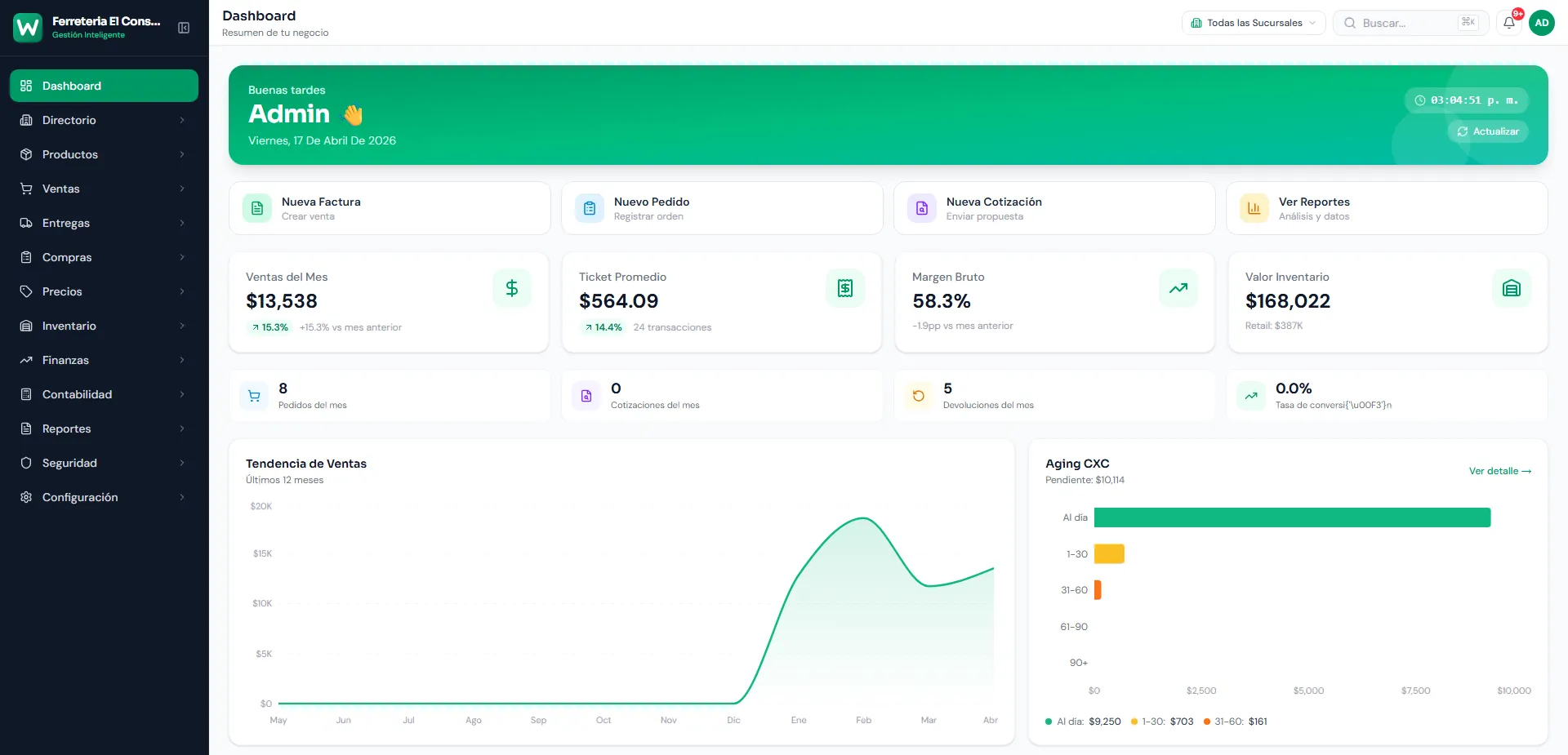
WMSPos

Point of sale and operations in one platform: sales, inventory, purchasing, dispatch, receivables and payables, accounting and reports. The cloud manages and every branch runs locally, so the store keeps selling without internet and syncs when it's back.

Runs on
Windows
Web
WMSPos back office dashboard, with demo data
Shopify

Sincrofy Connector

Connects your Shopify store to your point of sale or ERP. Products and stock go out to the store in real time, and orders and customers come into your system on their own.

Works with
Microsoft RMS
Status2 STModa
SAP
MS SQL
MySQL
PostgreSQL
SQLite
API

We also build your Shopify store: design, setup, mobile and SEO.

For pharmacies and distributors

From prescription to invoice.

Three systems for the pharmaceutical supply chain: the app pharmacies use to receive prescriptions and orders, the distributor's warehouse, and sending every invoice to the traceability platform.

Community pharmaciesApp Store 2020

Farmacias PR

RxFarmacias platform

Your patients send prescriptions with a photo, request refills and place orders from their phone. The pharmacy gets everything in a real-time dashboard, and a Windows program prints each new prescription without anyone lifting a finger.

Each pharmacy gets its own app, with its own name and brand.

Runs on
iOS
Android
Web (dashboard)
Windows (AutoPrint)

Patient app

  • Prescription by photo
  • Refills
  • Orders and delivery
  • Catalog, deals and services
  • Find pharmacies by town or QR code
  • Favorite pharmacies
  • Messages with the pharmacy
  • Medication reminders
  • Notifications
  • Sign in with Facebook or Apple

Pharmacy dashboard

  • Real-time inbox for prescriptions, refills and orders
  • Products, categories, deals and announcements
  • Notifications to your patients
  • Canned replies
  • Bulk price updates
  • Users and reports

RxFarmacias AutoPrint

  • Windows program that prints every new prescription or order on its own

History

  • 2020: the app reaches the App Store and Google Play
  • 2022: each pharmacy's app rebuilt from scratch, with a free upgrade
  • 2025: redesigned pharmacy dashboard
  • 2026: new version
Distributors and drug wholesalersApp Store 2021

HQWMS

The warehouse system for distributors and drug wholesalers. It tracks every product by location, lot and expiration date, with its NDC and generic equivalents, and runs the full sale: from quote to invoice, returns and the delivery route.

Runs on
Web
iOS
Android
Windows (labels)

Warehouse

  • Multiple warehouses
  • Locations
  • Transfers
  • Lots and expirations
  • NDC
  • Generic equivalents
  • Zebra labels with HQWMS Label Printer

Sales

  • Quotes
  • Orders
  • Invoices
  • Returns
  • Credit memos
  • Price lists
  • Customer licenses with expiration dates

Purchasing and finance

  • Purchase orders
  • Receiving
  • Accounts receivable
  • Accounts payable

On the road

  • Delivery routes
  • Sales rep reports

HQ WmsApp app

  • Sales and pending orders
  • Invoices and receivables
  • Payment receipts
  • Inventory by warehouse
  • Product editing
  • Printing from the phone
  • Orders with signature

History

  • 2020: warehouse app
  • 2021: HQ WmsApp on the App Store and Google Play
Pharmaceutical traceabilityHQWMS add-on

WMS Track & Trace

It takes HQWMS invoices and sends each product's data to the pharmaceutical traceability platform, with no retyping. It's built for the pharmaceutical traceability required in the U.S. (DSCSA).

Runs on
Windows
For running the business

Your business, from your phone.

Apps on the App Store and Google Play for everyday work: tech support, multiple branches, employee attendance and Microsoft RMS.

Tech support and field serviceNew in 2026

HQManager

Run your company's tech support. Every case is a ticket with its own thread, emails turn into tickets on their own and your team gets notified on their phones. The technician fills out the service sheet, the customer signs on screen and the PDF arrives by email, ready to invoice in QuickBooks Online.

Runs on
Web
iOS
Android

Tickets

  • Threaded conversations
  • Email to ticket
  • Push notifications
  • Departments
  • Dashboard
  • Points and a “Top performers” ranking

Customers

  • Customer portal
  • Service sheets signed on screen
  • PDF by email
  • Invoice in QuickBooks Online
  • Bulk email and WhatsApp with templates

Medical transport

  • Orders with a workflow
  • Drivers, patients and vehicles
  • Health plans
  • Signatures and survey
  • Live GPS map
  • Offline mode for drivers

Control

  • 69 permissions
  • Default roles
  • Audit log
Sales reps and collectionsApp Store 2021

CentralBaseHQ

The office on your sales reps' phones. They see their customers and stock in every warehouse, put together quotes and orders, and collect payments on the road with a printed or PDF receipt. Everything is saved in your central system.

Runs on
iOS
Android

Sales

  • Customers
  • Products with stock by warehouse
  • Quotes
  • Orders
  • Invoices

Collections

  • Accounts receivable
  • Collections and receipts
  • PDF and printer

History

  • 2021: on the App Store and Google Play
  • 2025: renewed app, set up with your company code
Employee attendanceSince 2020

FingerPrint

HQ FP Manager

Your employees' time clock. Each person clocks in and out with their fingerprint, a password or PIN, or from the app if you allow it, and you see hours worked by employee and department, with their schedules, and export the report as a PDF.

Runs on
iOS
Android
Web (admin)

How they clock in

  • Fingerprint reader
  • Password or PIN
  • From the app, with permission

What it tracks

  • Employees
  • Departments and groups
  • Schedules
  • Several companies
  • Hours worked
  • PDF reports

Web admin

  • Attendance dashboard
  • Punch records
  • Roles and permissions
  • Phone notifications

History

  • 2020: first time clock with a fingerprint reader
  • 2023: HQ FingerPrint Manager on the App Store and Google Play
  • 2025: clock-in with a password
Microsoft Dynamics RMSApp Store 2022

RmsUtilities

Everything your RMS doesn't do on its own. An app for the store floor and a web dashboard with reports, connected to your Microsoft Dynamics RMS database. More than 40 pharmacies, hardware stores and auto parts businesses have used it.

Runs on
iOS
Android
Web (dashboards)

Store app

  • Look up, edit and create products
  • Check alias codes
  • Stock collector with a scanner
  • Physical inventory
  • Purchase orders
  • Transaction verification
  • Your sales

Web dashboard

  • Sales dashboard
  • Pharmacy dashboard
  • Plus Reports
  • Accounts receivable
  • Membership offers
  • Expenses
  • Picking and deliveries
  • Sales tax report

Alerts and payments

  • SMS, WhatsApp and email alerts
  • Payments with AgilPay

History

  • Before 2019: first version
  • 2019: rebuilt with more modern technology
  • 2021: web dashboard and new app
  • 2022: on the App Store and Google Play
  • 2026: renewed app
Custom development

Doesn't exist? We'll build it.

Software built around how your business works: web apps, mobile apps and Windows programs, connected to what you already use.

What we build

  • Web apps

    Dashboards and portals you open from any browser, like HQManager's.

  • iOS and Android apps

    Six in-house apps published on the App Store and Google Play.

  • Windows programs

    Like RxFarmacias AutoPrint or Track & Trace, which run on their own on your business's computer.

  • Apps with your brand

    Each pharmacy gets its own app, with its name and logo.

  • Integrations

    QuickBooks Online, Shopify, WhatsApp, SAP Business One and Microsoft RMS.

How we work

  1. You tell us how you work

    We look at your operation and what you want to solve, in Spanish or English.

  2. We design the solution

    We propose the screens and the scope before writing code.

  3. We build and test

    We build it and test it before it reaches your hands.

  4. We install, train and support

    The same team that built it installs it, trains your staff and supports you afterwards.

Tell us your idea

Have a project in mind?

Tell us what you need and we'll tell you how we'd build it, no strings attached.

Message us